
Faceted browsing
For types the curator has configured with facets, AE RDF turns the instance list into a faceted search: a rail of clickable filters over chosen properties, with live counts, that narrows the list as you click. Everything is still a live query — no precomputed index.
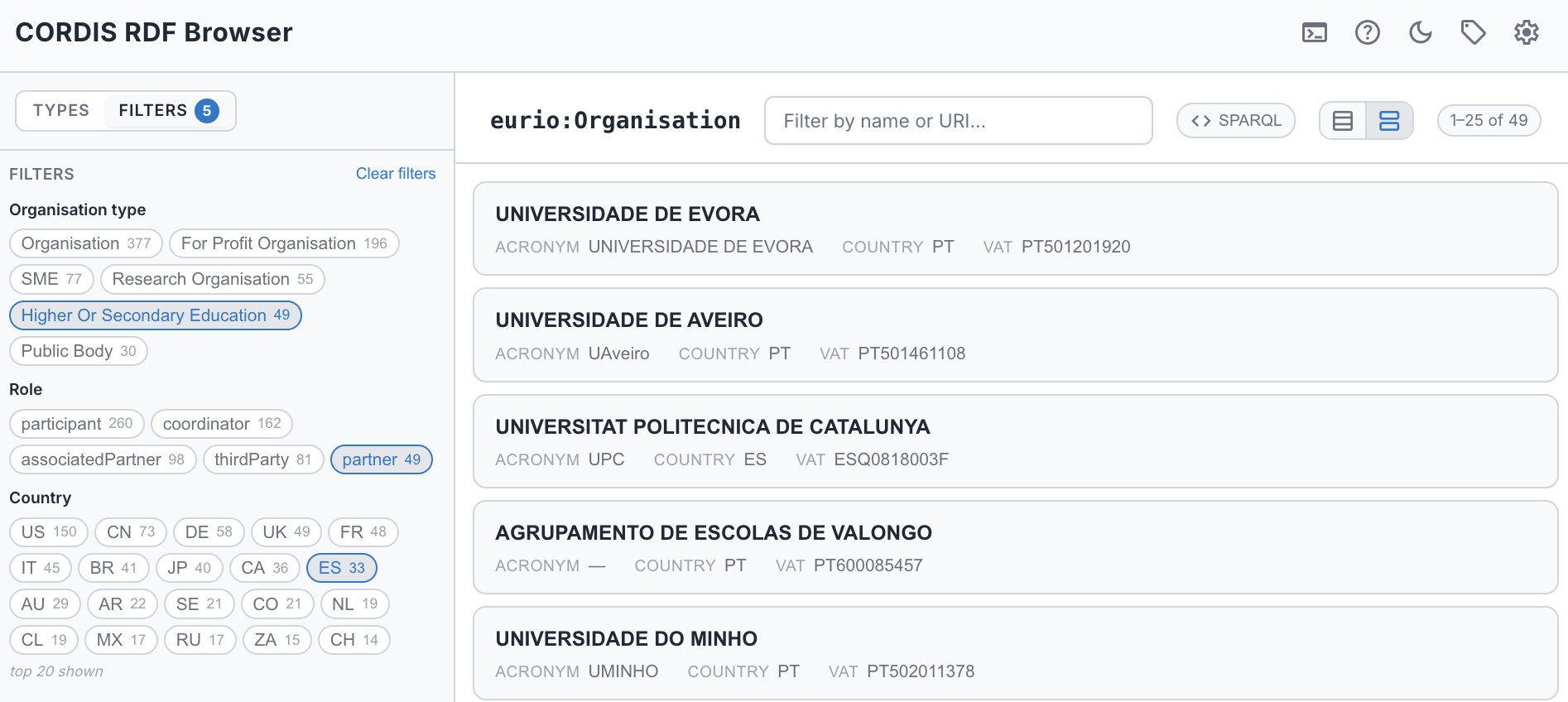
See it live → Spanish higher-education organisations that were project partners — the exact filtered view above.
The Filters rail
When a type has facets configured, the sidebar's header gains a Filters tab next to Types — switch to it for a full-height panel of clickable facets over chosen properties. A value facet lists a property's most common values (each with a count); a range facet offers numeric bands (e.g. total cost). Click a value or band to narrow the list; click again to deselect. You can pick several values in one facet (matches any of them) and combine facets (matches all of them). Each facet's counts update to show what you'd get by adding it, and the instance count tracks the filtered total. Use Clear filters to reset. Your selections are kept in the URL (?filters=…), so a filtered list is bookmarkable and shareable — and back/forward step through them (see Shareable URLs).
The Filters tab is greyed out for types with no facets, and shows a small count badge when filters are active — so you can see from the Types side that a filter is narrowing the list. Selecting a type never yanks you off the tab you're on; switching to a type with no facets simply drops you back to Types.
Kinds of facet
- Value facets — a property's most common values, each with a distinct-instance count (e.g. a project's status, an organisation's role).
- Range facets — numeric bands over a quantity (e.g. total cost bucketed into ranges).
- Date / year facets — bands over a date, compared by year (e.g. project start year).
- Multi-hop facets — a facet can reach a value one or more predicates away, so you can filter a project by a value inside its
hasTotalCostnode, or an organisation by the country of its site's address — not just its direct properties.
How selections combine
- Within one facet — picking several values matches any of them (OR).
- Across facets — every active facet must match (AND).
- Self-excluding counts — a facet's own value counts are computed with the other facets applied but not itself, so the numbers show what each value would add rather than dropping to what's already selected.
Curator-configured — Which types have facets — and over which properties, with what ranges and hops — is set by the curator in the config. Facets don't appear until they're configured.