
SPARQL panel
The  button in the header opens a read-only SPARQL panel, a syntax-highlighting editor for running your own queries against the current endpoint.
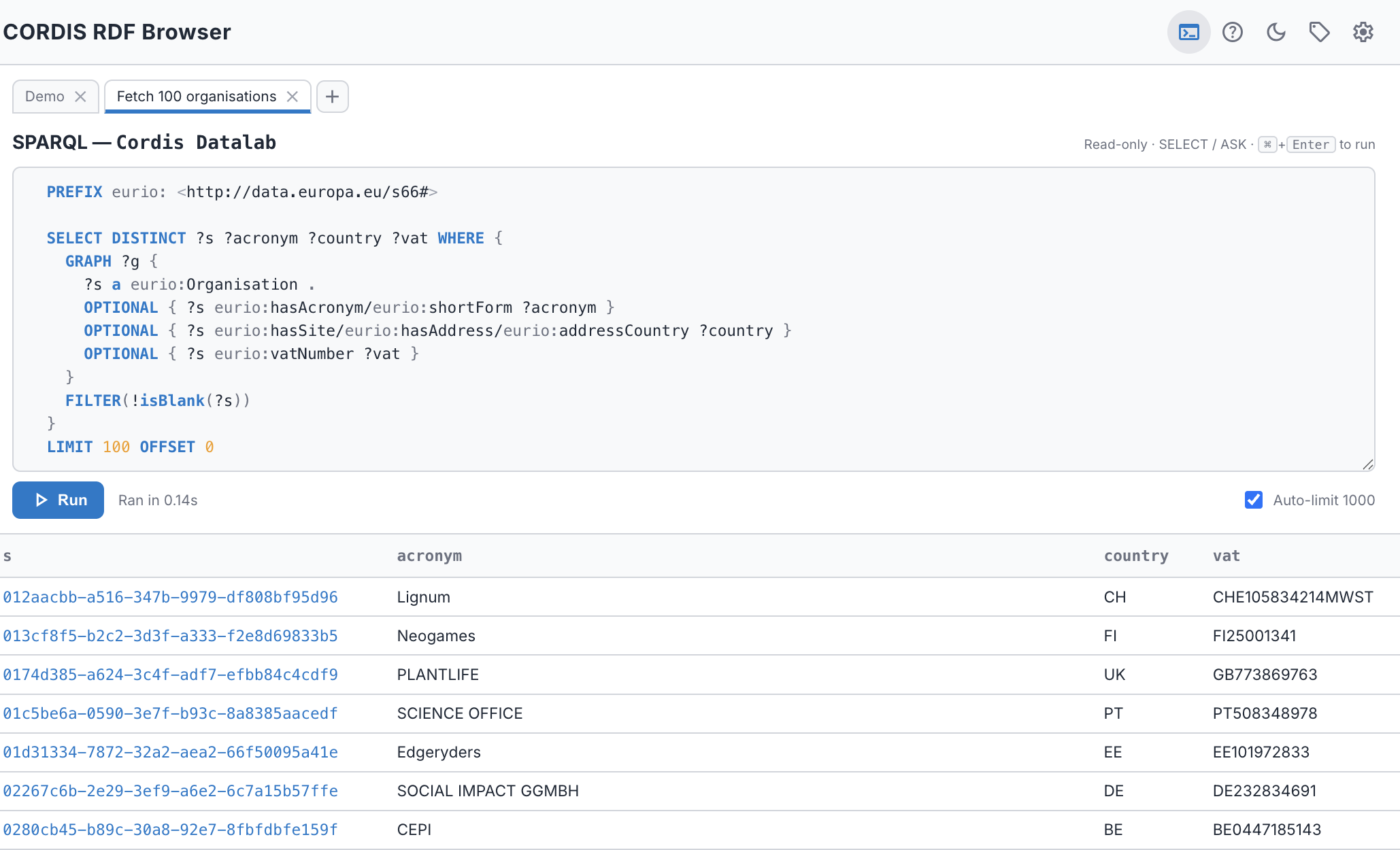
- Read-only. The four SPARQL read forms run —
SELECT,ASK,CONSTRUCTandDESCRIBE. Any write/update verb (INSERT,DELETE,LOAD,CLEAR,DROP, …) is refused before any request is sent. - Many named tabs. Keep several queries side by side: + opens a new tab, double-click a tab to rename it, ✕ closes it. Tabs (and their queries) are remembered per endpoint across reloads and endpoint switches.
- Graph queries as triples.
CONSTRUCTandDESCRIBEreturn an RDF graph, shown as a subject / predicate / object table with the same clickable URIs as any other result. (A bareDESCRIBE <uri>runs as-is; otherwise graph queries get the same automaticLIMITas aSELECT.) - Automatic LIMIT. A
SELECT/CONSTRUCT/DESCRIBEwith no top-levelLIMITgetsLIMIT 1000appended, and the panel tells you when it did. Turn this off with the Auto-limit toggle (or in Settings) to run the full result set. At most 1,000 rows render regardless. - Paginated results. The results table pages (50 per page) so a large result stays navigable.
- Portable queries. Full IRIs are written as
prefix:localwith aPREFIXprologue, and any prefix you type is auto-declared on Run — so the query in the editor is a complete, standalone query you can copy into any SPARQL tool. (Prefixes come from the shared prefix map, scoped to what the endpoint uses.) - Run it. Press Run, or ⌘/Ctrl+Enter. The query duration is shown on success.
- Clickable results. In a
SELECTorCONSTRUCT/DESCRIBEtable, URI cells are links — click one to open that resource in the browser.ASKshows a simpletrue/false.
Open in SPARQL
You don't have to write the query yourself. Above every instance list, a SPARQL button hands the current list — with its type, graph scope, text filter, and every active facet applied — to the panel as the exact query behind it, opened in a fresh tab. Use it to see how the filtered view is built, then refine it by hand.
Because the handed-off query is portable (qnames + PREFIX header, dotted triples), you can copy it straight out into another SPARQL client.